Using different browsers
Ray Phelan • 2 March 2025
Can I use Microsoft Edge, Apple Safari and Google Chrome browsers?
Yes you can use all three, with Google Chrome as the recommended browser to use to view your GeoMaps.
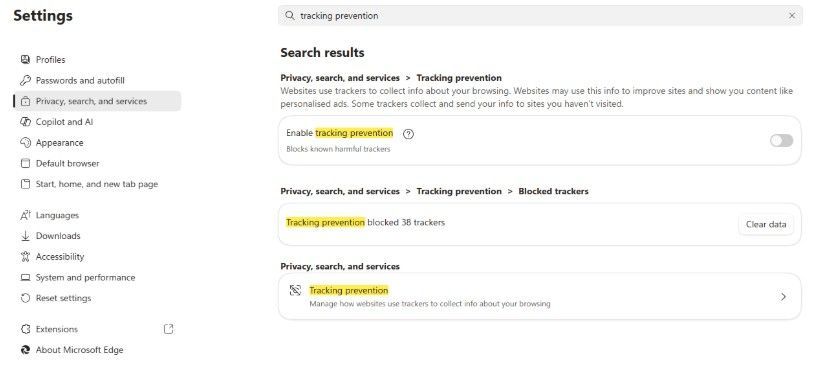
If you use Microsoft Edge and have a problem viewing, simply turn off "Enable Tracking Prevention" within your Edge browser settings (which tends to set by default) and you should then be able to view your GeoMap and the project locations.
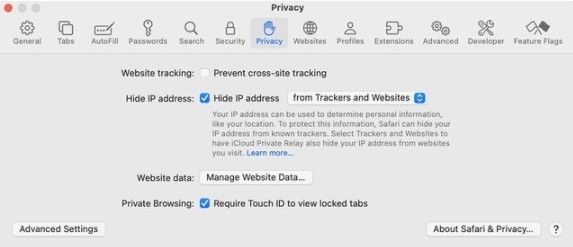
If you use an Apple Mac or the Safari browser and have a problem viewing, simply turn off the "Cross Site Tracking" within your browser privacy settings (which tends to set by default) and you should then be able to view your GeoMap and the project locations.

PLAN GeoMaps use the Google maps platform to present new Sales Leads because it's easy to use at home, in the office or when mobile. Because we use Google maps, in order to access your GeoMap or the Members Portal on the website, each user must have a Google account assigned to the email address they use to log in . It is really easy to set this up, just follow the instructions below:

The General Data Protection Regulation (GDPR) came into effect as EU legislation in May 2018 to govern how data about individuals must be processed and stored. Post Brexit, the UK continues to use the GDPR to ensure that data is kept secure and used responsibly.